Version 2.3.2 · free for 48 hours from the first installationDownload →
AISprintFlow
Windows desktop app · VS Code extension · Self-hosted for teams

From story to reviewed, tested draft pull request.

For engineering teams. AI SprintFlow reads the ticket in Jira, Salesforce, ServiceNow and more, plans the change, writes the code and tests, has an independent reviewer check it, and opens a draft pull request. People review and merge.

Free for 48 hours. Your AI model and key: you pay your provider, never us. Watch the 45-second tour.

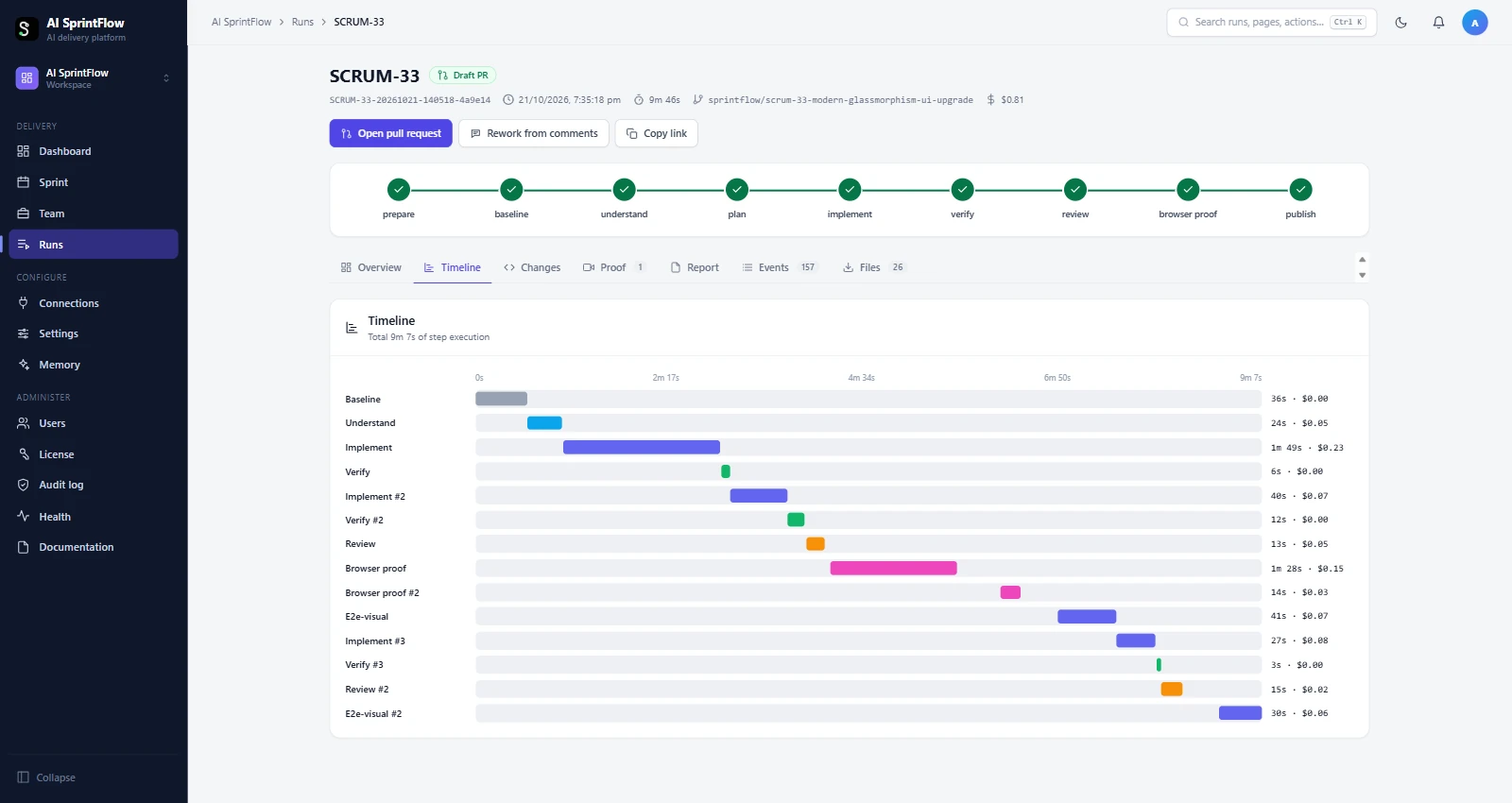
Example run · Jira story SCRUM-33 · 9 min 46 s · $0.81

AI SprintFlow — Run timeline
AI SprintFlow run timeline showing automated steps: prepare, baseline, understand, plan, implement, verify, review, browser proof, publish
Built inDraft PRs onlySecrets and personal data maskedSandboxed buildsAir-gap capableSSO, roles and audit log
Works with the tools you already use
JiraSalesforceServiceNowGitHubGitLabAzure DevOpsClaude
8 min
Median, ticket to tested and reviewed draft PR*
$0.43
Median AI cost per pull request*
6 / 6
PRs verified in a real org and approved by the AI reviewer*
0
Lines of code merged without your review

* Measured on 6 real Salesforce tickets, 20 Oct 2026 — see every ticket.

Connect your tracker. Follow the change.

Explore every feature
01

Choose the work.

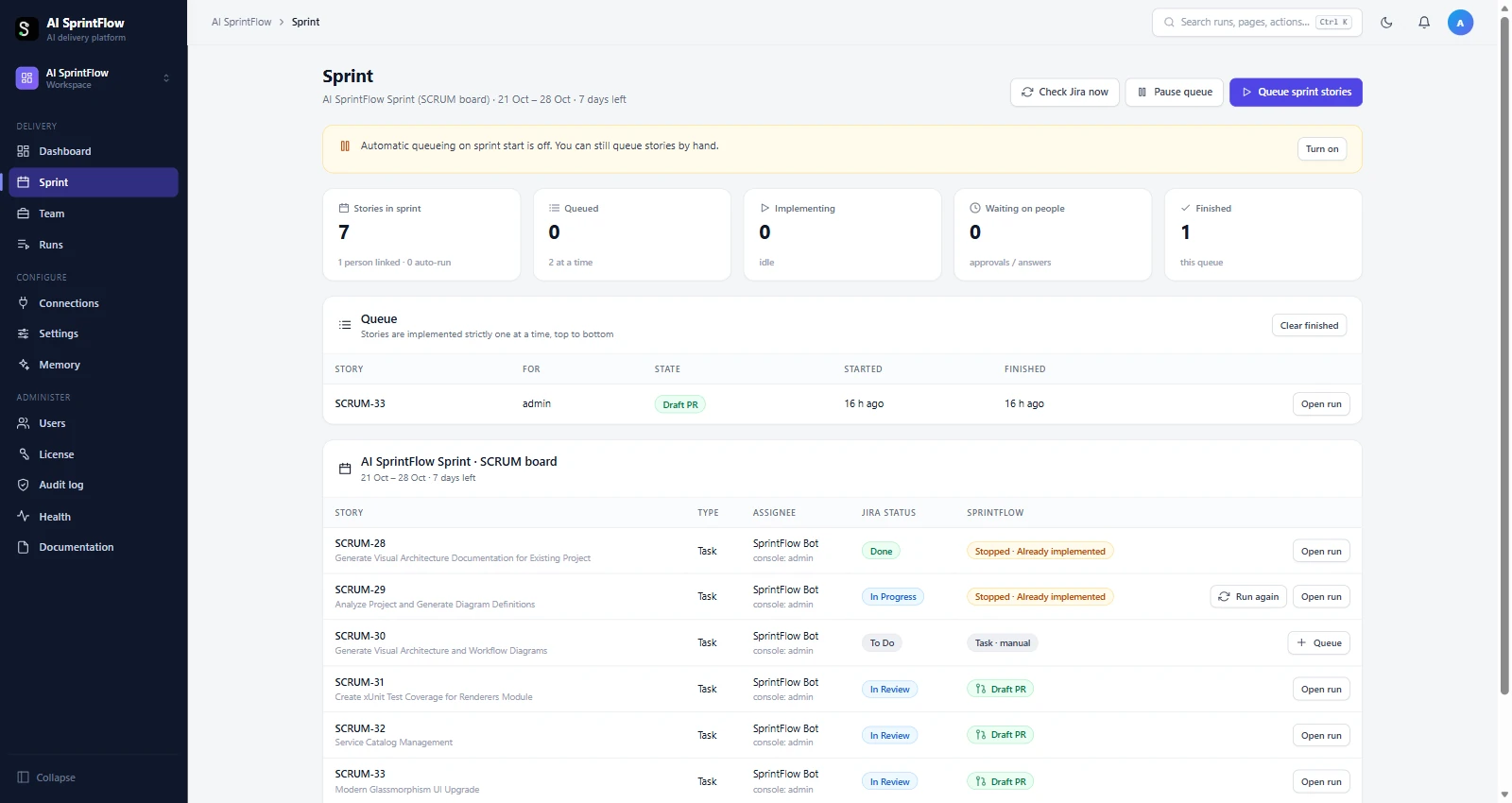
Connect your board and AI SprintFlow queues the stories of the sprint as it starts, or run a single ticket whenever you like. It reads the ticket, its comments and screenshots, and asks on the ticket when something is unclear.

  • Understand: clear acceptance criteria from the ticket
  • Plan: where the change belongs, file by file
The sprint queue with live status for every story
02

It writes, builds and tests the change.

The code and the tests follow your team's rules. It builds the project and runs your tests against a baseline of the untouched code, in a throwaway container, and fixes what it broke.

  • Implement: code and tests in your conventions
  • Verify: build and test against the baseline
  • Browser proof: a recording of the story working
A run's timeline: every step with its time and cost
03

Review the draft pull request and evidence.

An independent AI reviewer checks the change against the acceptance criteria. The branch is pushed, a draft pull request opened and the ticket updated. People review and merge; AI SprintFlow never does.

  • Review: an independent check of every change
  • Publish: draft PR, ticket comment and proof video
Runs with their outcome, pull request and cost
New · Analysis

Understand the code before you change it.

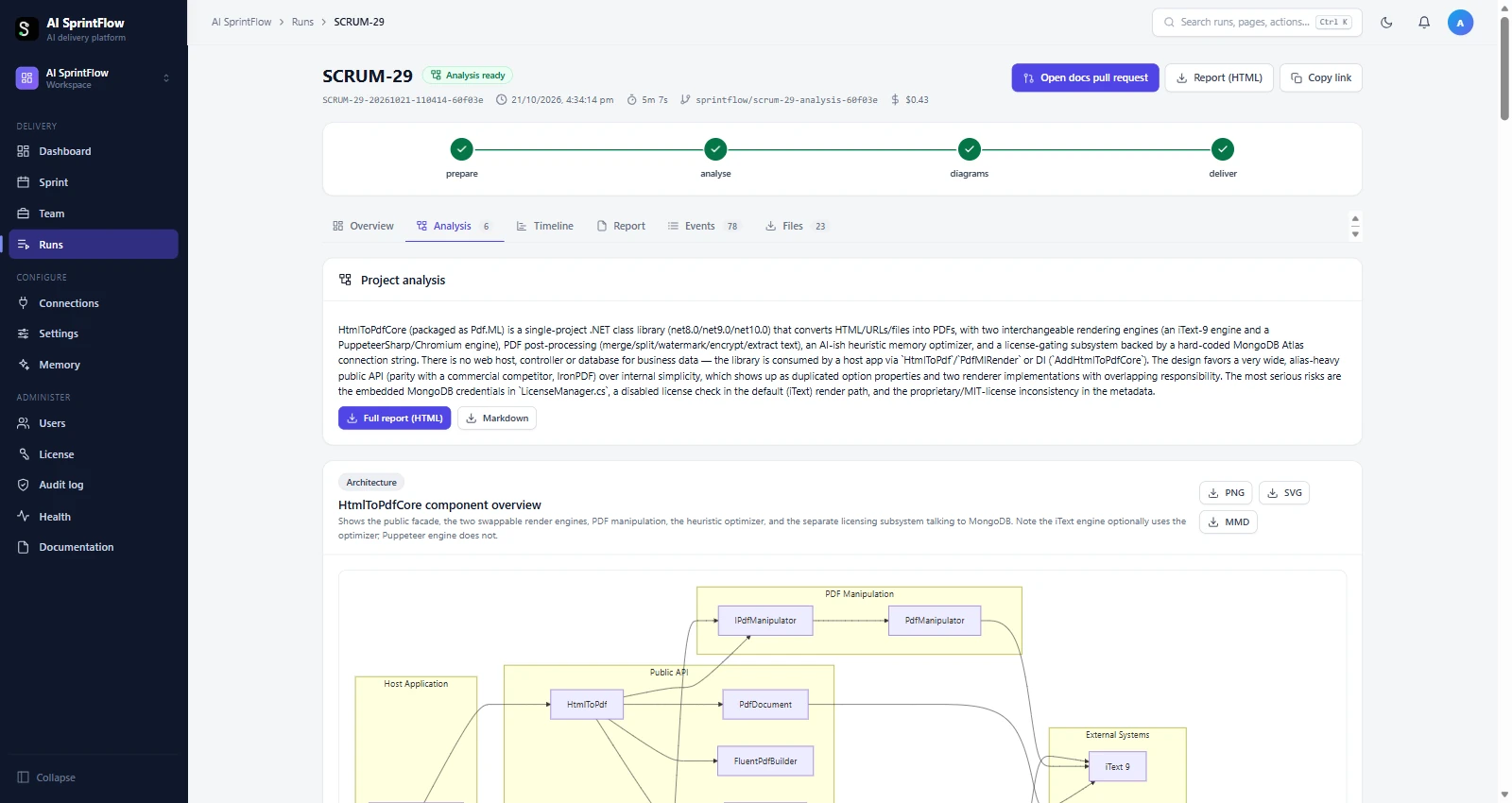
Point AI SprintFlow at a ticket or a whole repository and get an architecture report with UML and architecture diagrams - components, classes, sequences, data model - drawn from the real code. On the ticket, in an HTML report, and in a docs pull request if you like. No code is changed.

  • Architecture, component, UML class, sequence, ER and state diagrams
  • Where a ticket belongs, the approach, risks and open questions
  • A typical analysis takes a few minutes
An analysis in AI SprintFlow: the project summary and its architecture diagram

See it work.

The sprint queue, a live run, the dashboard, connections, settings and the team view.

Read the quick start

Connect your tools.

Browse every integration

Tickets

Where the work comes from

Jira CloudJira Data CenterSalesforceServiceNowGitHub IssuesGitLab IssuesAzure BoardsLinearYouTrackShortcutZendeskFreshdeskSentryAsanamonday.comClickUpTrello

Code hosts

Where the draft pull request opens

GitHubGitLabBitbucketAzure DevOpsGiteaAny git server

AI models

Your key, your provider, your cost

Anthropic ClaudeAmazon BedrockGoogle Vertex AIOpenAIAzure OpenAIGoogle GeminiMistralDeepSeekGroqOpenRouterOllamaLM StudiovLLMYour own endpoint

Team chat and alerts

Where people hear about it

SlackMicrosoft TeamsEmailWebhooks

You control access and merging.

Built for regulated, security-conscious teams: self-host on your servers or Kubernetes, air-gapped if you need it.

Read the security model

Merge policy

Draft pull requests only. No code path can merge, approve or mark a pull request ready, and risk rules and code owners ask for a person's approval.

Data guard

Personal data and secrets are replaced with placeholders before anything reaches the model. Credential files are never shown, and Bedrock can stay in-region.

Isolated builds

Build and test commands run in throwaway containers with no network. Budgets, a stop switch, SSO with roles and an audit log of everything.

Built for real codebases and real budgets.

01

Small changes, small bills

Cost caps per run, per day and per month, with the cost of every step on the timeline. Local models cost nothing.

02

Your data stays yours

Runs on your computer or your servers. Only the parts the model needs go to the AI provider you chose; nothing is sent to us.

03

People stay in charge

Every change arrives as a draft pull request. Nothing is merged by AI SprintFlow.

04

Gets better on your code

Learns your build commands, flaky tests and conventions, so later stories go faster and cost less.

Measured results

6 Salesforce tickets, 6 draft pull requests, 46 minutes.

A real project built from scratch on 20 Oct 2026: the Account 360 app (Apex, Lightning Web Components and Apex tests). Every pull request was deployed check-only with its Apex tests in a Salesforce org, approved by the independent AI reviewer, and left as a draft for a person to merge.

46 min
total, ticket to draft PR
$2.30
AI cost for all 6 pull requests
1,269
lines of code and metadata
28
Apex test methods written
CaseWhat was builtMinutesAI costFiles / lines Apex testsProof
1028Contact validation rule (Apex trigger)2.2$0.136 / 1155✓ Apex tests in the org
1030Account summary card (Apex + LWC)11.9$0.477 / 2324✓ Browser video, 8/10 criteria
1032Account 360 data service (Apex)8.4$0.504 / 2144✓ Apex tests, 8/11 criteria
1033Account 360 card on the Account page (LWC)10.2$0.467 / 2544✓ Browser video, 5/7 criteria
1034Health badge: Green / Amber / Red5.2$0.358 / 2576✓ Browser video, 5/8 criteria
1035Open opportunities table, largest first7.9$0.397 / 1975✓ Browser video, 4/6 criteria

The final run of each ticket, from the app's own run records (Salesforce Developer Edition, Claude with the customer's own key). “Criteria”: acceptance criteria shown by a recorded browser test or an Apex test run.

Pay per seat, not per token.

The AI model is billed by your provider, with cost caps per run, per day and per month.

See plan details
01

Free trial

Every feature, on your own tickets and repositories.

Free
for 48 hours, no card needed
  • Every feature
  • One user, one computer
  • Desktop app or self-hosted
  • Your own AI model and key
Get it from Microsoft Store
03

Enterprise

Your servers, your network, your contract.

Custom
for large or regulated teams
  • Everything in Team
  • Self-hosted on your servers or Kubernetes
  • Air-gapped: licenses are checked offline
  • PostgreSQL, S3 and worker queues
  • Help with your rollout
Contact us

Questions before you start.

Book a live demo
Does AI SprintFlow merge code?

No. It opens draft pull requests and comments on the ticket. Your team reviews and merges as usual.

Which ticket systems work?

Jira (Cloud and Data Center), Salesforce (Agile Accelerator, Service Cloud Cases, DevOps Center), ServiceNow, GitHub Issues, GitLab Issues, Azure Boards, Linear, YouTrack, Shortcut, Zendesk, Freshdesk, Sentry, Asana, monday.com, ClickUp and Trello - several at once if you like, with a switcher to show one at a time. No tracker? Describe a task in AI SprintFlow or in Slack.

Our sprint spans several repositories. Does that work?

Yes. Connect every Git account your teams use - GitHub, GitLab, Bitbucket, Azure DevOps, on-premises servers - and list the projects each one holds. A story's project name picks the repository and the account whose token is used.

Do you support Salesforce development?

Yes. Before the pull request, AI SprintFlow validates Apex, Lightning web components and other metadata against your sandbox with a check-only deploy and your Apex tests - nothing in the org changes, and nothing extra to install.

Which AI model does it use?

The one you choose: Claude (Anthropic, Amazon Bedrock or Google Vertex AI), OpenAI, Azure OpenAI, Gemini, Mistral, DeepSeek, Groq, OpenRouter, a model on your own hardware with Ollama, LM Studio or vLLM, or any OpenAI-compatible endpoint you enter yourself. You pay your provider directly for what you use.

Where does my code go?

Your repository is cloned to the computer or server running AI SprintFlow. Only the parts the model needs are sent to the AI provider you chose, and with a local model nothing leaves your network. Nothing is sent to us.

Which languages and frameworks work?

Any your build tools support: .NET, Java, Node.js, Python, Go and more. AI SprintFlow runs your own build and test commands, on your machine or in a container.

How does the free trial work?

AI SprintFlow is free for 48 hours from the first installation, with every feature, for one user on one computer, no card needed. After that a license is required - installing it unblocks everything, with nothing lost. Need longer for a pilot? Ask us for an evaluation key.

Can we run it for the whole team?

Yes. Self-host one shared installation with Docker Compose or Kubernetes, with single sign-on, roles, an audit log and usage reporting.

Bring your next story.

Free for 48 hours with every feature. Bring your tickets, your repositories and your AI model.

Start with one repository.